Sponsored link
LuckyBlockWorld
First-session route

Lucky Block World Beginner Guide

A first hour that survives contact with the game: mine a timed sample of Diamond Lucky Blocks, claim a free private server where builds save, verify persistence with a two-minute rejoin test, and only then start the dream house — with a plan built on your own measured rate.

Onboarding order

The five-step first session

Ordered so that every expensive mistake happens while it is still cheap.

  1. 1. Join through the Lucky_World group's live place

    Servers hold up to 30 players. If the old link in an old video will not load, the group page lists the live Lucky Block World place — same name, same description, same developer.

  2. 2. Mine a timed sample

    Count blocks over sixty seconds and note the number. That single measurement turns the mining planner from a toy into a schedule.

  3. 3. Claim a free private server

    The description promises they're free. Build a marked box (say 5×5) as your save-test rig.

  4. 4. Run the rejoin test

    Place blocks, drop an item, rejoin, check. If something didn't persist, you learned it with five blocks, not five hundred.

  5. 5. Plan the dream house

    Sketch dimensions, estimate materials in the build planner, then divide by your measured mining rate for the total time budget.

Core lessons

Understand these systems first

The whole documented game, in four lessons.

The loop, straight from the description

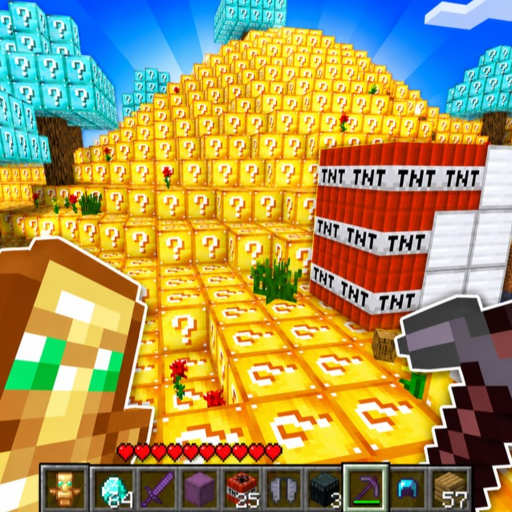
The official Roblox description packs the whole game into three lines: mine Diamond Lucky Blocks, build your dream house, or PvP; builds save on a private server and those servers are free; items save no matter what server you're on. The Lucky_World group's own tagline adds the scale: "The whole world is lucky blocks! You can never mine all of them!" Mining is the engine, building is the sink, PvP is the spice.

  • Mine: every block in the world is a lucky block; Diamond Lucky Blocks are the named prize.
  • Build: your house lives on a free private server where it persists.
  • PvP: advertised as a headline activity, not a hidden mode.

Why your first hour should start in a private server

The description makes one save promise unconditional (items save everywhere) and one conditional (builds save on a private server). A new player who builds on a public server and logs off may find nothing the next day — the description never promises public-server builds persist. Private servers being free removes the usual Roblox reason to avoid them, so the efficient first hour is: join a private server, mine, build, and let the save system work for you.

Measure, don't memorize

No mining rate, break time, or drop table has ever been published for this game, and any rate you read elsewhere belongs to a different lucky-block game. The workable habit: pick a landmark, mine for a timed minute, count the blocks, and enter that number in the mining planner. Repeat after each game update — the live place's September 27, 2026 update is exactly the kind of event that can change block behavior.

Verify saves the way the community does

The independent fan wiki (checked August 19, 2026) recommends the same rejoin test this site does: place a few blocks and drop a few items, leave, rejoin, and confirm everything is where you left it. Two minutes of testing answers questions the developer has never documented — and it teaches you the save flow before your dream house is on the line.
If stuck

First-session roadblocks

A save didn't stick

Confirm you were on a private server for builds — the description ties build saves to private servers only, while items save everywhere. Then repeat the rejoin test before rebuilding; a one-off sync hiccup is cheaper to discover twice than to assume once.

The place won't load

The place this site originally linked has shown unavailable metadata since September 20, 2026. The group's live Lucky Block World place is the current destination — check either from your own Roblox client, because availability can be account- or device-specific.

Avoid

Beginner mistakes

Trusting a rate from another game

Search results for lucky-block games are a wall of same-name collisions — Minecraft mods, Be a Lucky Block, Break a Lucky Block!. None of their numbers describe this world.

Building big before the rejoin test

The rejoin test exists so you learn the save flow at five-block cost. Skipping it to start the dream house immediately is how players lose an evening of work.

Treating planner output as a game promise

The tools do arithmetic on your inputs. A plan that says 112 minutes is a schedule, not a drop-rate guarantee.

FAQ

Beginner questions

What is confirmed for Lucky Block World?

The official Roblox description confirms Diamond Lucky Block mining, dream-house building, saved items across servers, free private-server build saves, and PvP. Platform metadata adds a 30-player server cap.

Is there a best tool or best block list?

No. No item roster, tool tier, or drop table has ever been published for this game, and this site does not invent one — see the tier-list page's evidence framework.

Do I have to pay for a private server?

No — the official description states private servers are free, which is unusual among Roblox sandbox games and is the reason the save system is practical for everyone.

How do I measure my mining rate?

Mine for one timed minute and count blocks, or divide a session's total blocks by its minutes. Enter the result in the mining planner; the example on the calculator page walks through the arithmetic.

Mining Planner

Turn your measured rate into a session plan.

Building & Saves

The full persistence picture: what saves where.

Wiki hub

All six confirmed systems at a glance.

Browse every guide